
Website Speed Optimization: Why It Matters and How to Make Your Website Lightning Fast

If your website is slow, you are losing money.
Not maybe. Not sometimes.
You are losing visitors, leads, and sales.
A slow website kills trust. People don’t wait. They close the tab.
In this guide, you will learn:
- Why website speed is important
- How page speed affects SEO
- What slows down your website
- How to fix slow website issues
- Tools to test website speed
- Real solutions to make your site faster
Let’s get into it.
What Is Website Speed?
Website speed means how fast your website loads when someone opens it.
It includes:
- Page load time
- Time to first byte (TTFB)
- Core Web Vitals
- Server response time
- Mobile page speed
If your website takes more than 3 seconds to load, many users will leave.
Google also checks speed when ranking websites.
That means speed affects SEO and rankings.
Why Website Speed Is Important for SEO
Google uses speed as a ranking factor.
Especially after the Core Web Vitals update, speed matters more than ever.
Core Web Vitals include:
- Largest Contentful Paint (LCP)
- First Input Delay (FID)
- Cumulative Layout Shift (CLS)
If these are poor, your rankings drop.
A fast website:
- Improves search engine ranking
- Reduces bounce rate
- Increases user experience
- Improves conversion rate
- Boosts mobile SEO
If you want to rank higher in Google, speed optimization is not optional.
How Slow Website Affects Your Business
Let’s be honest.
People are impatient.
If your website:
- Loads slowly
- Feels laggy
- Jumps while loading
- Takes time on mobile
They leave.
That means:
- Less traffic
- Fewer leads
- Lower sales
- Poor brand trust
Speed is not technical only. It directly affects money.
Common Reasons Why Websites Are Slow
Most website owners do not know why their website is slow.
Here are the most common reasons.
1. Heavy Images

Uploading large images without compression slows down your website.
Common mistakes:
- Uploading 5MB images
- Not using WebP format
- No image compression
- No lazy loading
Images should be optimized before upload.
2. Poor Hosting Server
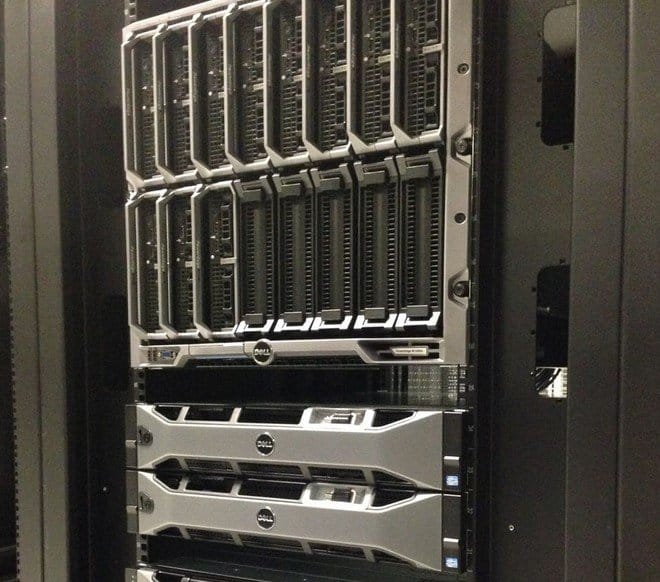
Cheap hosting often means slow server response time.
If your server is slow:
- High TTFB
- Slow backend
- Slow database queries
- Downtime issues
Good hosting improves performance instantly.
If you are serious about business, invest in quality hosting.
3. Too Many Plugins (WordPress)
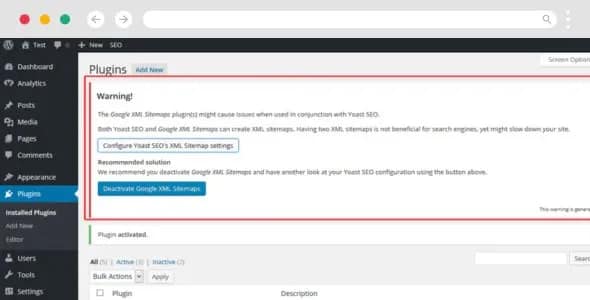
Many WordPress websites are slow because of:
- Too many plugins
- Badly coded plugins
- Plugin conflicts
- No caching plugin
You don’t need 40 plugins.
You need the right ones.
If you want professional help, check our
👉 https://come2theweb.com/services/website-speed-optimization/
4. No Caching Setup
Caching stores static files so your site loads faster.
Without caching:
- Server works harder
- Pages load slower
- Users wait longer
Caching is basic but powerful.
5. Unoptimized Code (CSS, JS, HTML)
Large CSS and JavaScript files slow down rendering.
Problems include:
- Unused CSS
- Render blocking JS
- No minification
- No file compression
Code optimization improves loading time quickly.
How to Check Website Speed
You should test your website speed regularly.
Use tools like:
- Google PageSpeed Insights
- GTmetrix
- Google Search Console
- Lighthouse
These tools show:
- Performance score
- Core Web Vitals
- Optimization suggestions
- Mobile speed issues
Focus especially on mobile performance.
Most traffic today is mobile.
Core Web Vitals Explained Simply
1. Largest Contentful Paint (LCP)
How fast the main content loads.
Good score: under 2.5 seconds.
2. First Input Delay (FID)
How fast the site responds when user clicks.
3. Cumulative Layout Shift (CLS)
How stable the page is while loading.
If buttons move or text jumps, CLS is bad.
Fixing these improves SEO directly.
How to Improve Website Speed (Step-by-Step)
Now let’s fix it.
Step 1: Optimize Images
- Use WebP format
- Compress before upload
- Enable lazy loading
- Resize images properly
Never upload raw camera images.
Step 2: Enable Caching
Install a good caching system.
Use:
- Page cache
- Browser cache
- Object cache
This reduces server load and improves speed.
Step 3: Use CDN (Content Delivery Network)
CDN stores your files on global servers.
So users load files from nearest location.
Benefits:
- Faster global access
- Reduced server load
- Better uptime
CDN is powerful for international traffic.
Step 4: Reduce Plugins
Audit your plugins.
Remove:
- Unused plugins
- Heavy plugins
- Duplicate functionality
Less plugins = better performance.
Step 5: Minify CSS and JavaScript
Minification removes:
- Extra spaces
- Unused code
- Comments
This reduces file size.
Step 6: Upgrade Hosting
If everything is optimized but still slow, hosting is the problem.
Move from:
- Shared hosting → VPS
- Low-quality provider → Performance hosting
Good hosting changes everything.
Mobile Speed Optimization
Google uses mobile-first indexing.
That means Google checks your mobile site first.
If your mobile site is slow:
- Rankings drop
- Conversions drop
- Traffic reduces
Test mobile speed separately.
Fix:
- Mobile images
- Mobile layout shifts
- Mobile JavaScript
Mobile speed is critical in 2026.
Website Speed and Conversion Rate
Faster websites convert more.
Why?
Because:
- Users trust fast sites
- Fast checkout improves sales
- Quick loading improves engagement
- Smooth browsing keeps users longer
Even 1-second improvement can increase conversion rate.
Speed = revenue.
Signs You Need Professional Speed Optimization
You should consider expert help if:
- PageSpeed score below 70
- High bounce rate
- Poor Core Web Vitals
- Slow admin dashboard
- Hosting confusion
- Website feels heavy
Speed optimization is technical.
Wrong changes can break your site.
If you want safe and professional help, visit: https://come2theweb.com/services/website-speed-optimization/
Why Choose Come2theweb for Website Speed Optimization?
At Come2theweb, we focus on:
- WordPress speed optimization
- Core Web Vitals improvement
- Server optimization
- Database cleanup
- Plugin performance tuning
- Advanced caching setup
- Image optimization
- CDN integration
We do real technical work. Not just install one plugin.
We test before and after performance.
We improve:
- Page load time
- TTFB
- Google PageSpeed score
- Mobile performance
- SEO signals
Speed is not magic. It’s structure + optimization + clean setup.
Final Thoughts
If your website is slow, fix it now.
Speed affects:
- SEO
- User experience
- Conversion rate
- Brand trust
- Revenue
A fast website gives you an unfair advantage.
Most competitors ignore speed.
You should not.
If you want your website to load in under 2 seconds and pass Core Web Vitals, we can help.
👉 Visit: https://come2theweb.com/services/website-speed-optimization/
Make your website fast. Rank higher. Convert better. Grow faster. 🚀