
How to Tell If Your WordPress Website Has Been Hacked (7 Common Signs)
A hacked website can damage your reputation, hurt your search rankings, and even drive customers away.
Many website owners don’t realize their site has been compromised until visitors start reporting problems or Google displays security warnings.
In fact, WordPress websites are one of the most targeted platforms in the world because they are widely used and often not updated properly.
The good news is that most hacked WordPress websites show warning signs before serious damage occurs.
If you catch these signs early, you can fix the issue before it spreads, protects your data, and saves your Google rankings.
Here are seven common signs that your website may have been hacked.
1. Your Website Redirects Visitors to Another Website
One of the most common and dangerous signs of a hacked WordPress website is unexpected redirects.
A visitor opens your website and suddenly lands on:
- Gambling websites
- Fake shopping websites
- Adult content pages
- Suspicious download pages
This usually happens when hackers inject malicious scripts into your website files or database. These scripts are designed to detect certain users, like mobile visitors or Google bots, and then redirect them silently.
That is why sometimes you may not see the issue yourself, but your customers are facing it.
Even worse, these redirects can only appear in specific conditions, making them very hard to detect manually.
If users report strange redirects, investigate immediately. Also check your website on different devices and browsers to confirm.
A quick test you can do is open your website in:
* Incognito mode
* Mobile phone
* Different internet connection
If anything unusual happens, your site may already be compromised.
2. Google Shows “This Site May Be Hacked”
Search for your website name in Google.
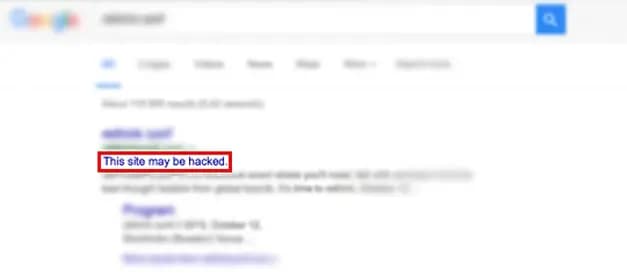
If you see messages such as:
- This site may be hacked
- This site may harm your computer
- Deceptive site ahead
This is a serious warning from Google. It means Google has detected suspicious activity on your website.
At this stage, your traffic may already start dropping because users trust Google warnings more than your website.
This usually happens when:
* Malware is detected in your files
* Spam pages are indexed
* Your website is sending malicious scripts
Once flagged, your website can lose visibility in search results almost instantly.
You should immediately check Google Search Console and look for:
* Security issues report
* Manual actions
* Indexed spam URLs
Fixing this quickly is very important because recovery can take days or even weeks.
3. Strange Japanese or Chinese Pages Appear in Search Results
Many WordPress hacks involve SEO spam.
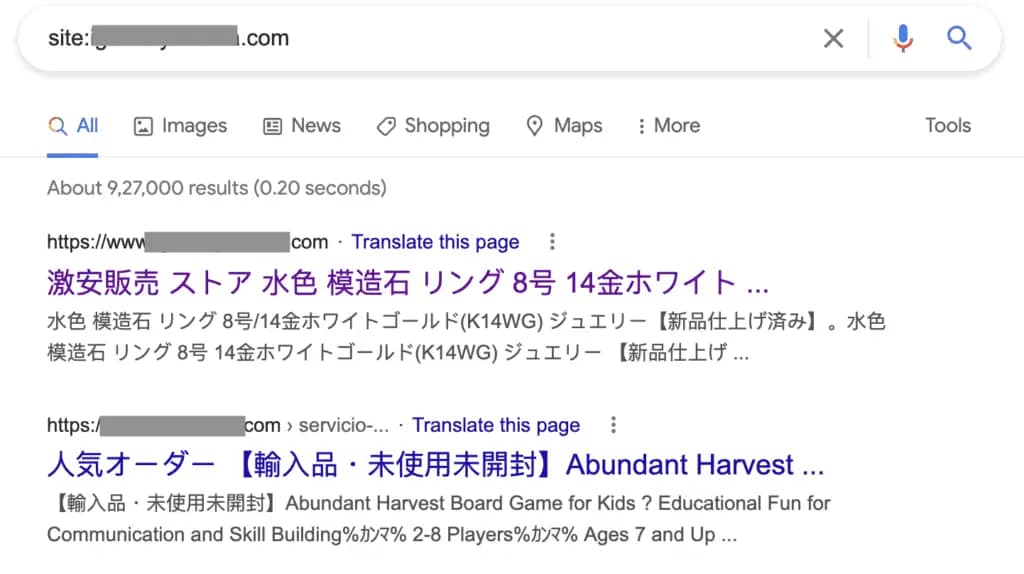
Hackers create hundreds of hidden pages containing:
- Japanese text
- Chinese text
- Fake product listings
- Spam keywords
These pages are usually not visible in your normal website navigation. Instead, they are hidden deep inside your files or database.
The purpose of these pages is to:
* Rank in Google for spam keywords
* Redirect traffic to scam websites
* Earn money through illegal SEO tricks
You may never see these pages while browsing your website, but Google can still index them.
A simple way to check is:
site:yourdomain.com
Go through the results carefully. If you notice strange titles, foreign language pages, or unknown URLs, your website may be compromised.
Also check your Google Search Console “Pages” report for unusual spikes in indexed URLs.
4. Unknown Admin Users Appear
Visit: yourwebsite.com/wp-admin
Users → All Users
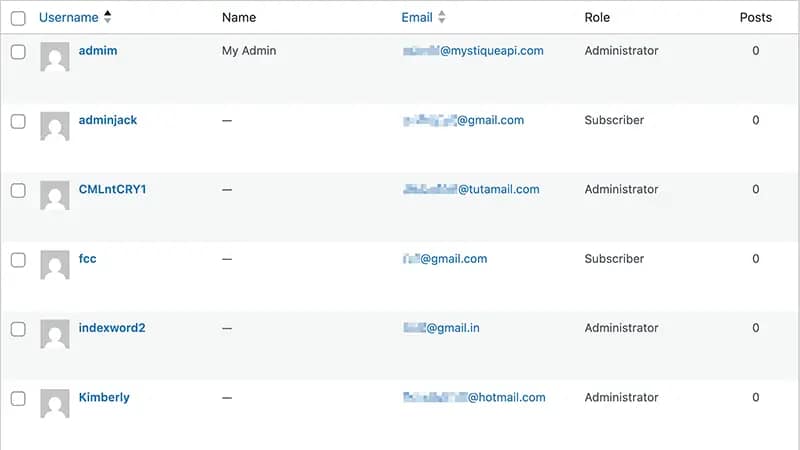
Look carefully for:
- Unknown administrator accounts
- Suspicious usernames
- Users you didn’t create
This is one of the most dangerous signs of a hack.
Once hackers get admin access, they can:
* Install malware plugins
* Edit theme files
* Create hidden pages
* Lock you out of your own website
In many cases, hackers intentionally create backup admin accounts so even if you remove one, they still retain access.
If you find any unknown user:
* Delete it immediately
* Change all passwords
* Check file integrity
* Scan your website for malware
Also, always ensure that only trusted people have admin access. Too many admins increases risk.
5. Your Website Suddenly Becomes Slow
A hacked website often uses additional server resources without your knowledge.
Malware can:
- Send spam emails
- Generate fake pages
- Run hidden scripts
- Contact external servers
This results in sudden performance issues.
You may notice:
* Pages take longer to load
* Admin dashboard becomes slow
* Server CPU usage increases
* Hosting alerts about resource usage
Many website owners think this is just a hosting issue, but in reality, malware is often the cause.
If your website was fast before and suddenly becomes slow without changes, it is worth investigating immediately.
You can also use tools like Google PageSpeed Insights or GTmetrix to compare performance before and after.
6. Hosting Company Suspends Your Account
Many hosting providers automatically detect:
- Malware infections
- Spam activity
- Excessive server usage
If your hosting provider suspends your website unexpectedly, do not panic.
This is actually a protective step to prevent further damage.
Most hosting companies do this when:
* Your website is sending spam emails
* Malware scripts are detected
* Your site is attacking other servers unknowingly
They may temporarily disable your site until you clean it.
If this happens:
* Contact hosting support immediately
* Ask for malware scan report
* Restore from clean backup if available
Ignoring this can make the situation worse and may affect your domain reputation.
7. Unexpected Changes Appear on Your Website
This is one of the easiest signs to notice, but often ignored.
Examples include:
- Strange popups
- New links
- Unknown advertisements
- Modified content
- New files
These changes usually happen because hackers inject code into:
* Theme files
* Plugin files
* Header or footer scripts
* Database content
Sometimes you may see ads or links that you never added. These are often used for spam SEO or affiliate fraud.
Even small changes should not be ignored. If you notice anything unusual, it is better to scan the site immediately.
Why WordPress Websites Get Hacked
Most WordPress hacks happen because of:
- Outdated plugins
- Outdated themes
- Weak passwords
- Nulled themes
- Poor hosting security
- Lack of regular maintenance
Hackers usually do not target websites manually. Instead, they use bots that scan thousands of websites every day looking for weaknesses.
If your website has even a small security gap, it can be exploited automatically.
That is why regular updates are not optional, they are necessary.
How to Protect Your WordPress Website
A secure WordPress website requires:
- Regular updates
- Daily backups
- Security monitoring
- Strong passwords
- Trusted hosting
- Ongoing maintenance
In addition to this, you should:
* Use a security plugin
* Limit login attempts
* Disable unused plugins
* Remove unused themes
* Monitor file changes
Security is not a one-time task. It requires continuous attention.
Even a well-built website can become vulnerable if not maintained properly.
Need Help Cleaning a Hacked WordPress Website?
If your website is showing any of the signs above, acting quickly can prevent further damage.
Delaying can lead to:
* Loss of Google rankings
* Blacklisting by search engines
* Customer trust issues
* Permanent data damage
At Come2theweb, we help businesses with:
- WordPress Security & Malware Fix
- Website Maintenance & Support
- Website Speed Optimization
- Managed Hosting
- WordPress Development
Our goal is simple: keep your website fast, secure, and running smoothly.